
Design and manage your website, together with AI agents
Use Ycode Cloud to get started in minutes, or self-host it on your own infrastructure.
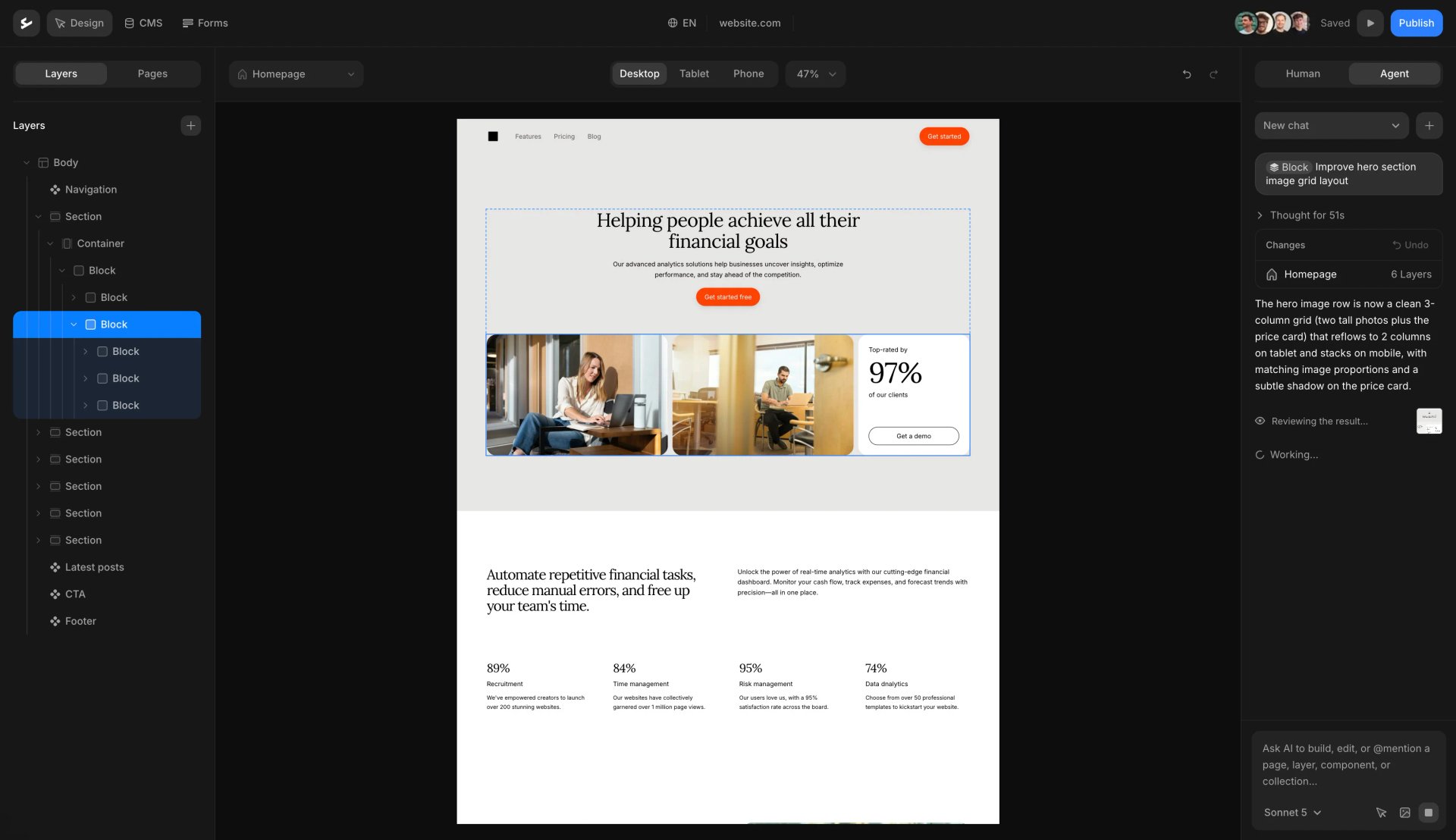

Website builders have become incredibly powerful, but they often come with trade-offs. When you build on a closed platform, your website lives inside their ecosystem. Your design, content, and infrastructure depend on their pricing, rules, and roadmap.
We believe building a website shouldn’t mean giving up control. Ycode combines a modern visual builder with the freedom of open source — so you can self-host it on your own infrastructure or use Ycode Cloud if you prefer a fully managed setup.
Bring your own AI
Anthropic (Claude)
Opus 5, Fable 5, Sonnet 5
OpenAI (ChatGPT)
GPT-5.5, GPT-5 Mini
Google Gemini
Gemini 3.1 Pro, Gemini 3.5 Flash
xAI (Grok)
Grok 4.5, Grok 4.3
Design with a prompt
Update layouts, spacing, styles, and responsive behavior without editing every element manually.
Manage your CMS
Create collections, add fields, update content, and organize structured data through conversation.
Build reusable components
Create new components or improve existing ones while keeping your website consistent.
Run Ycode yourself
Fork the repo, deploy it to Vercel, connect Supabase, and you’re ready to build.
1. Fork the repository
Create your own copy of Ycode on GitHub.
2. Deploy to Vercel
Launch your project in minutes using Vercel.
3. Connect Supabase
Add your Supabase and start building.
Pricing
Flexible pricing for self-hosting, cloud, and agencies.
Monthly
Yearly (Save up to 33%)
Self-host
Free
forever
Open source Ycode platform
Host on your own infrastructure
Full code access
Custom domains
Unlimited users
Unlimited pages
Unlimited CMS collections
Unlimited form entries
Unlimited languages
Community support
Cloud Basic
$10
$15
per project/month


Fully managed Ycode hosting
Automatic updates and maintenance
Global CDN and fast hosting
Custom domains
Unlimited users
Unlimited pages
5 CMS collections
Unlimited form entries
2 languages
Community & email support
Cloud Pro
$25
$30
per project/month

Fully managed Ycode hosting
Automatic updates and maintenance
Global CDN and fast hosting
Custom domains
Unlimited users
Unlimited pages
50 CMS collections
Unlimited form entries
Unlimited languages
Community & email support
Releases
0.2.0
Adds collection filtering with pagination, dynamic sorting, and improved component overrides. Includes many fixes and UX improvements across publishing, filters, and the rich-text editor.
Mar 3, 2026
Build with the community
Connect with designers, creators, and founders building and sharing with Ycode.
Join us on Discord"I switched to Ycode from Webflow due to its competitive pricing and ease of use. The animation capabilities are both simple and powerful, and creating a gradient background takes just minutes. Ycode continually rolls out amazing features, and their responsive customer service is always ready to help."
Mercedes Madanire
Product leader & start-up advisor

"Thanks a lot to the Ycode team for building such a great tool!
PS: We switched from WebFlow to Ycode and what a good decision it was."
Pascal
Founder of Yuppa

"Top of the art tool for designing websites compared to Webflow. Also GDPR compliant in many ways and the team is engaging with the community on new releases."
Mikael Larsen
Designer at BK Aktiweb

"For me, it's the best option between WordPress and Webflow. It fits perfectly in my case."
Fabiano F
Marketing Project Manager

"If you're looking for a powerful and user-friendly Webflow alternative, Ycode is a top contender..."
Piotr Bak
Founder of Digital Agency

"We've been using Ycode for almost 2 years now, and it's been a great experience. We rebuilt our website and migrated from another CMS with minimal involvement from our IT department."
Olha L
Growth Marketing Manager

FAQs
Is there an open source alternative to Webflow?
Yes. Ycode is an open source Webflow alternative that lets you build websites visually while keeping full control over your code and infrastructure. Unlike Webflow, your website is not tied to a single platform — you can host it yourself, modify the code, and adapt it as your needs grow.
Can I self-host a Webflow alternative?
Yes, but only with open source tools. Ycode allows you to run your website on your own infrastructure, which means you control hosting, performance, and deployment. This is something Webflow does not offer, as all sites must be hosted within its platform.
Why are people looking for Webflow alternatives?
Most users start looking for Webflow alternatives when their projects grow. Common reasons include increasing costs, limited control over hosting, and dependency on Webflow’s ecosystem. Open source alternatives solve this by giving you full ownership and the ability to run your site independently.
What are the limitations of Webflow?
Webflow is a closed platform, which means your website depends on its pricing, hosting, and product decisions. You cannot self-host your site, and moving away often requires rebuilding. These limitations become more noticeable as your project scales or needs more flexibility.
What is an open source website builder?
An open source website builder gives you access to the underlying code and allows you to host your website anywhere. This means you’re not locked into one provider and can fully control how your site is built, deployed, and maintained.
Do I fully own my website with Ycode?
Yes. With Ycode, you own your website’s code, content, and infrastructure. You can run it on your own servers, move it between environments, and continue using it independently of any single company.
Can I migrate from Webflow to an open source alternative?
Yes, but it usually requires rebuilding your site. Webflow does not provide a full export of your project structure. Many teams choose to move when they want more control, flexibility, or predictable long-term costs.
What are the benefits of using an open source Webflow alternative?
The main benefits are ownership, flexibility, and long-term control. You can host your website anywhere, avoid platform lock-in, and adapt your setup as your project grows — without being limited by a single provider’s roadmap or pricing.
Does Ycode include a CMS like Webflow?
Yes. Ycode includes a built-in CMS that lets you manage dynamic content such as blog posts, pages, and collections. The key difference is that you are not limited by a closed platform — you can extend and control how your data is structured and us
Your website should stay yours
© Ycode Inc. 2026